Looking for the plugin? You can find it on GitHub and QGIS Hub.
For those of you that don’t know, the Israeli QGIS user community* holds a monthly online meeting (open day) where we discuss various QGIS related topics, plugins, and features. So just like the official QGIS Open Days, but in Hebrew.
I usually MC the event, and since Israel is a small country with a small QGIS user base, we have a lot of repeating faces.
*Which is not a formal user group, but we’re working on that.
Last week, before the open day (which was on January 29th), one of the participants, Eithan, was going to speak about vector tiles and told me that my script helped him a lot.
He then reminded me that a few months ago I wrote a basic script for an expression function that fixes the issue with curved labels for RTL languages (or at least for Hebrew) in QGIS.
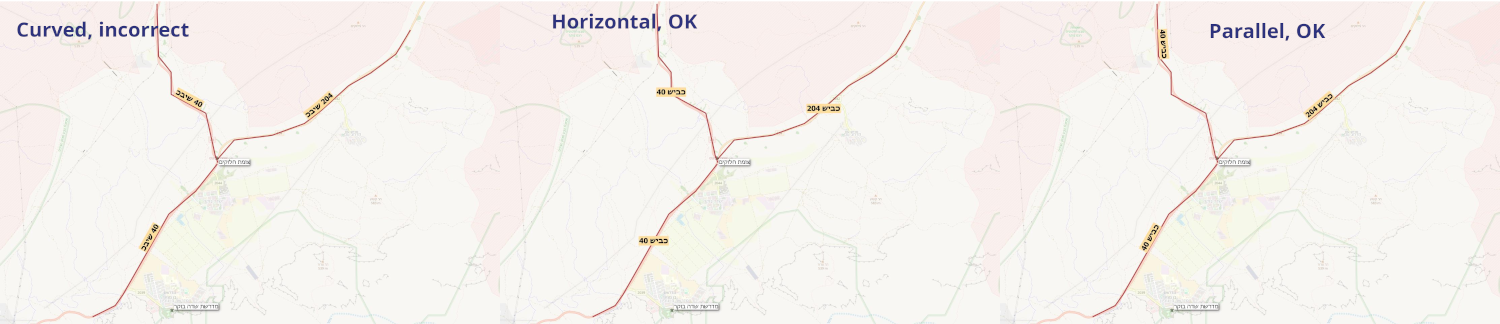
What the function does is reverse only the RTL letters in the a string, while keeping the LTR letters and the overall string structure in place. So for example, the string “שלום World” would become “םולש World”, which when placed on a curved line would appear correctly.
Some exposition for those of you blessed with simple LTR languages.
The issue with curved labels for RTL languages in QGIS is that when you use the “Curved” placement option for labels, the letters are placed in reverse order.
This is quite a long standing issue and has been discussed in various QGIS issues (#21940, #54098 ).
From what I understand, it’s currently not possible to fix this issue in the QGIS core for various reasons, so the best we can do is find workarounds.
I thought about it for a moment and realized that while the script worked, it was not very user friendly.
Not just the fact that adding custom expression functions is not something every user is familiar with, but also the fact that the script required users to manually add the function to the expression of each label that needed fixing.
But we know that users install plugins all the time, so that can solve problem number one.
And for problem number two, I could create a plugin that would automatically find all labels with curved placement, and fix them automatically by simply adding the function as a wrapper around the expression.
So I built a plugin base with the Plugin Builder 3 plugin, and started working on the logic.
There wasn’t a lot of logic to add, mostly just going through all of the layers in the project, checking if they have labels enabled, checking if the placement is curved, and then updating the expression.
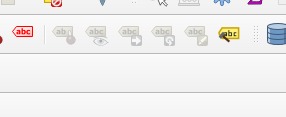
So as to make the plugin minimalistic and optional, I added a simple action button that would run the fixing function when clicked.
Even the icon was easy to create, I opened the SVG for one of the label icons in Inkscape, copied the “tag” part of the SVG twice, changed the color of one of them to brown and the other to gray, and rotated them a bit to create a “hammer”. Took less time than describing it.
I uploaded v0.1 of the plugin to QGIS Hub and shared it with our community activists before the open day.
The whole process took a couple of hours, during the evening and I figured I would post and share about it after the open day so that I could keep posting about the open day until it happened.

The plugin was approved and published on QGIS Hub at around 22:00 PM on January 28th.
On January 29th at 08:00 AM, it had 10 downloads. I guessed it was mostly our community members downloading it and maybe someone who saw it under “New Plugins”.
At 08:18 I already had the first issue reported by a user I didn’t know, which was great.
Arabic (and similar languages) wasn’t being rendered correctly.
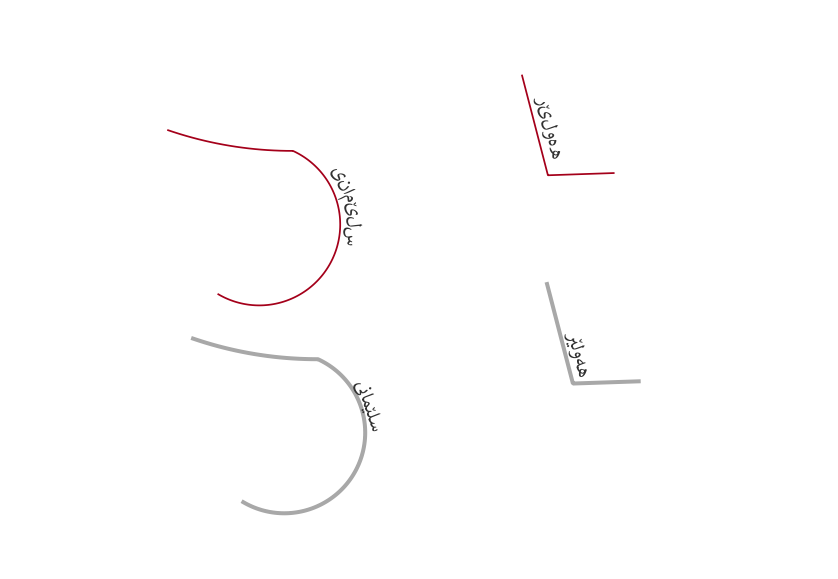
When I built the function, I only tested it with Hebrew text, and I didn’t consider that Arabic letters have different forms depending on their position in the word (initial, medial, final, isolated).
We have that in Hebrew too, but the letters are written seperately, so the issue doesn’t apply.
Since Arabic letters are connected, simply reversing the letters doesn’t work.
Now I had two new problems:
- I needed to fix the function to support Arabic letters
- I don’t know enough (I wasn’t a very good student in high school) Arabic to test it properly. I knew a bit. Enough to recognize letters, and see that there was an issue, but not enough solve it.
So I did what any self respecting developer would do, I asked for help. In this case, I asked an LLM for help. This was required because I needed a better understanding of the language structure and the letter forms and because I needed them converted to unicode so that I wouldn’t have to rely on external libraries (personal preference of mine to make the plugin experience better for users).
After a few (a lot) iterations, I had a working function that supported both Hebrew and Arabic (and to some extent Kurdish and Farsi) letters.
I was still missing some special cases, which I could tell were missing but could not fix, but the basic structure was there.
I updated the plugin to v0.3 (0.2 and 0.2.1 were other minor fixes that I removed from QGIS hub before they were approved) and published it again.
So now we have a plugin that can fix curved RTL labels in QGIS for both Hebrew and Arabic at the click of a button.
A personal achievement for me was getting the plugin action button to appear in the label toolbar, as there is no direct way to do that in the PyQGIS API.
What’s next?
Right now, I don’t know.
As far as I can tell, the plugin is working well and doing what it is supposed to do.
But writing this post serves also as a way to notify users about the plugin and that they should report any issues they find.
So if you find any issues, or have any suggestions for improvements, feel free to open an issue (or a pull request) on the GitHub repository.
The script for the function is also there, and in case anyone actually uses the scripts from my QGIS Expression Functions repository, I updated the script there as well.